By
Sanjana Chavali
July 1, 2026
•
8
min read

Your training team does solid work. Your LMS is set up well. Courses are professional, assessments are rigorous, completion rates look good.
But here's what happens after training ends:
This isn't a motivation problem. It's neuroscience. Memory decays fast without intervention [Ebbinghaus, 1885].
Most LMS platforms show 95% completion. But completion doesn't stop the forgetting curve. Your managers spend hours re-teaching the same material.
Research shows three mechanisms prevent forgetting [Dunlosky et al., 2013; Cepeda et al., 2006]:
This playbook walks you through building it. Your LMS still handles core training and compliance. This sits on top as a reinforcement layer that actually prevents forgetting.
Pick one process or procedure that:
Interview 5-10 staff members:
"When did you learn this? What do you remember clearly? What do you forget? When do you need to ask for help?"
Interview 3-5 managers:
"What questions do you get most about this process? Where do staff struggle? How much time do you spend re-teaching this?"
Document the forgetting pattern. Not just "they forgot," but specifically:
This tells you exactly where the forgetting curve is hitting hardest.
Example: POS refund process
This audit becomes your content map.
Don't write content yet. Design the reinforcement intervals first.
The forgetting curve suggests: reinforcement works best at increasing intervals.
Template for 30-day reinforcement:
Days 1-5: Daily (highest forgetting rates)
Week 2: Every other day
Week 3: 2x per week
This schedule is built on research about spacing intervals [Cepeda et al., 2006]. Don't guess at the timing. The research shows specific intervals work better than others. Create a simple calendar for the content you're building. Don't start writing until you know when each piece is being delivered.
This is different from how you write training content.
What NOT to do:
What to do: Write for recall. Each piece should be one idea that can be tested.
Example: POS Refund Process - Day 1
Short form: "Refund rule: Within 30 days = refund. Outside 30 days = manager approval. Original payment method = refund method (card back to card, cash = offer credit first)."
Then quiz: "Customer bought shirt 25 days ago. Paid cash. Wants refund. What do you do?"
The content is short, specific, testable.
Structure each piece this way:
This isn't comprehensive training. It's reinforcement of what they already know (they did the core training). Your job is making sure they remember it.
Your content lives somewhere. It needs to:
Platform options:
Build custom: 5-8 weeks development, requires technical team.
Use LMS tools that have robust microlearning systems built-in: 2-3 weeks setup, designed for spaced scheduling and recall testing.
For Indian retail: Mobile-first is non-negotiable. Your team is mobile, connectivity is unpredictable, breaks are short.
Pick your platform before writing content. Content format depends on what the platform can deliver.
This is the critical window. First 30 days determine whether retention sticks or falls back to the forgetting curve.
Week 1: Daily reinforcement
Setup automated delivery:
Track completion. Follow up with anyone who doesn't engage by day 2.
Week 2-4: Every other day to 2x per week
Content gets progressively more complex (scenarios with decision trees, not just simple recalls).
Quiz results matter now. You're starting to see who's retaining vs. who's struggling.
Track during this phase:
This is where you differ from traditional training metrics.
Don't measure:
Do measure:
Simple dashboard to track:
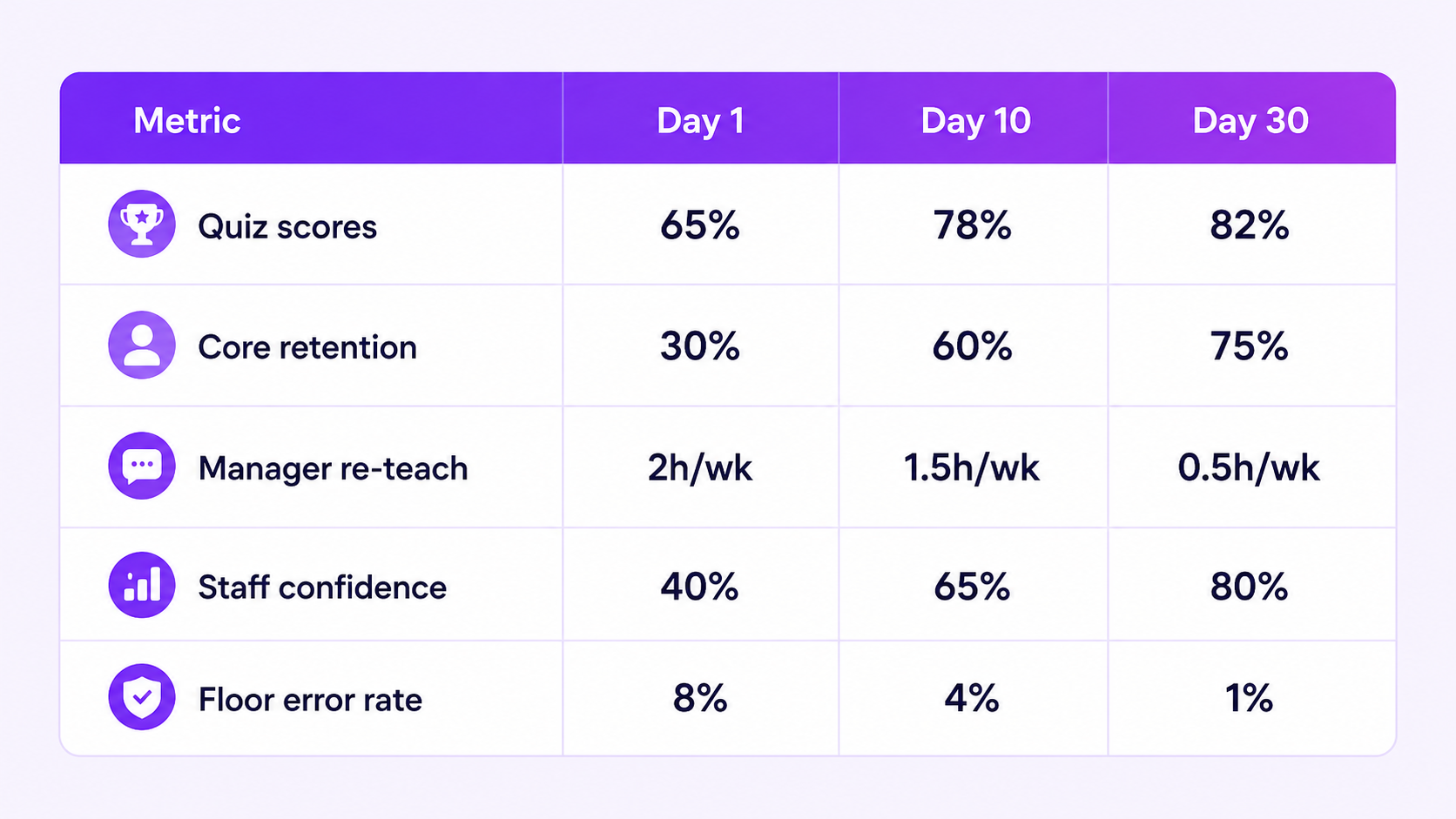
This tells you whether retention is actually happening or whether your team is just getting good at passing quizzes.
After 30 days on one process, you have a template. Repeat for:
Don't try to turn everything into microlearning at once. One process at a time, learn what works, then scale.
Timeline: 6-8 weeks from audit to full rollout on one process (audit and design in parallel with platform setup, pilot in week 4-5, measure impact by week 8).
People:
Budget:
Technology:
Month 1: Staff engaging daily (75%+ completion). Quiz scores trending up (60% → 80% by day 30). Manager feedback: "Fewer questions about this."
Month 2-3: Manager re-teaching time down 60-70%. Error rate down 50-70%. Staff confidence increases. Ready to add second process.
Month 6: 3-4 processes reinforced. Manager time recovered: 5-10 hours per week. Compliance incidents down 50%+.
You can build this manually. Pick a process, audit it, design the intervals, write the content, set up a platform, launch it, monitor it, iterate on it.
It works. Your team retains more. Your managers spend less time re-teaching. Your error rates drop.
But you know what takes the most time? Content creation. Writing 30 micro-pieces, timing them right, getting the quiz questions precise, adjusting based on pilot feedback. A training manager's time is best spent coaching teams on flagship courses, not writing micro-content pieces for a spaced learning calendar.
Frontlyne Intelligence automates this. Feed it your documents, and it auto-creates a course with options to add assessments and role-plays. It curates content, times it, and adjusts difficulty based on what learners already know and what they need to know.
You get the retention benefits of this playbook without manually writing 30 micro-content pieces.


Your training team does solid work. Your LMS is set up well. Courses are professional, assessments are rigorous, completion rates look good.
But here's what happens after training ends:
This isn't a motivation problem. It's neuroscience. Memory decays fast without intervention [Ebbinghaus, 1885].
Most LMS platforms show 95% completion. But completion doesn't stop the forgetting curve. Your managers spend hours re-teaching the same material.
Research shows three mechanisms prevent forgetting [Dunlosky et al., 2013; Cepeda et al., 2006]:
This playbook walks you through building it. Your LMS still handles core training and compliance. This sits on top as a reinforcement layer that actually prevents forgetting.
Pick one process or procedure that:
Interview 5-10 staff members:
"When did you learn this? What do you remember clearly? What do you forget? When do you need to ask for help?"
Interview 3-5 managers:
"What questions do you get most about this process? Where do staff struggle? How much time do you spend re-teaching this?"
Document the forgetting pattern. Not just "they forgot," but specifically:
This tells you exactly where the forgetting curve is hitting hardest.
Example: POS refund process
This audit becomes your content map.
Don't write content yet. Design the reinforcement intervals first.
The forgetting curve suggests: reinforcement works best at increasing intervals.
Template for 30-day reinforcement:
Days 1-5: Daily (highest forgetting rates)
Week 2: Every other day
Week 3: 2x per week
This schedule is built on research about spacing intervals [Cepeda et al., 2006]. Don't guess at the timing. The research shows specific intervals work better than others. Create a simple calendar for the content you're building. Don't start writing until you know when each piece is being delivered.
This is different from how you write training content.
What NOT to do:
What to do: Write for recall. Each piece should be one idea that can be tested.
Example: POS Refund Process - Day 1
Short form: "Refund rule: Within 30 days = refund. Outside 30 days = manager approval. Original payment method = refund method (card back to card, cash = offer credit first)."
Then quiz: "Customer bought shirt 25 days ago. Paid cash. Wants refund. What do you do?"
The content is short, specific, testable.
Structure each piece this way:
This isn't comprehensive training. It's reinforcement of what they already know (they did the core training). Your job is making sure they remember it.
Your content lives somewhere. It needs to:
Platform options:
Build custom: 5-8 weeks development, requires technical team.
Use LMS tools that have robust microlearning systems built-in: 2-3 weeks setup, designed for spaced scheduling and recall testing.
For Indian retail: Mobile-first is non-negotiable. Your team is mobile, connectivity is unpredictable, breaks are short.
Pick your platform before writing content. Content format depends on what the platform can deliver.
This is the critical window. First 30 days determine whether retention sticks or falls back to the forgetting curve.
Week 1: Daily reinforcement
Setup automated delivery:
Track completion. Follow up with anyone who doesn't engage by day 2.
Week 2-4: Every other day to 2x per week
Content gets progressively more complex (scenarios with decision trees, not just simple recalls).
Quiz results matter now. You're starting to see who's retaining vs. who's struggling.
Track during this phase:
This is where you differ from traditional training metrics.
Don't measure:
Do measure:
Simple dashboard to track:
This tells you whether retention is actually happening or whether your team is just getting good at passing quizzes.
After 30 days on one process, you have a template. Repeat for:
Don't try to turn everything into microlearning at once. One process at a time, learn what works, then scale.
Timeline: 6-8 weeks from audit to full rollout on one process (audit and design in parallel with platform setup, pilot in week 4-5, measure impact by week 8).
People:
Budget:
Technology:
Month 1: Staff engaging daily (75%+ completion). Quiz scores trending up (60% → 80% by day 30). Manager feedback: "Fewer questions about this."
Month 2-3: Manager re-teaching time down 60-70%. Error rate down 50-70%. Staff confidence increases. Ready to add second process.
Month 6: 3-4 processes reinforced. Manager time recovered: 5-10 hours per week. Compliance incidents down 50%+.
You can build this manually. Pick a process, audit it, design the intervals, write the content, set up a platform, launch it, monitor it, iterate on it.
It works. Your team retains more. Your managers spend less time re-teaching. Your error rates drop.
But you know what takes the most time? Content creation. Writing 30 micro-pieces, timing them right, getting the quiz questions precise, adjusting based on pilot feedback. A training manager's time is best spent coaching teams on flagship courses, not writing micro-content pieces for a spaced learning calendar.
Frontlyne Intelligence automates this. Feed it your documents, and it auto-creates a course with options to add assessments and role-plays. It curates content, times it, and adjusts difficulty based on what learners already know and what they need to know.
You get the retention benefits of this playbook without manually writing 30 micro-content pieces.
Join the brands building better frontline workforces. Live in 50 days. No IT complexity. Dedicated support from day one.



.jpg)


.png)


%20-%20Copy.png)


.jpg)
.jpg)
.png)
.png)
.png)
.png)